New features after a week of testing: speaker diarisation and more
Over the past week I've been testing Murmel with podcast makers, cultural organisations, universities, NGOs, and civil servants. Those conversations consistently produce concrete insights: what's working well, what's missing, and what would be most valuable to build next.
Based on that feedback, several new features have been added to Murmel.
Speaker diarisation
The most-requested feature is now available. Murmel automatically detects who is speaking and labels each line by speaker. So you don't just see what was said, but also by whom.
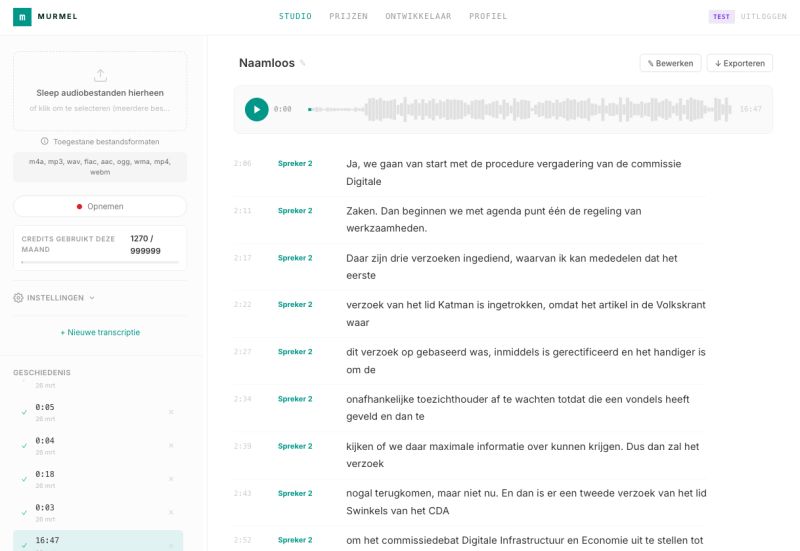
Murmel Studio shows each line per speaker, with timestamps at word and segment level.
This is especially useful for meetings, interviews, and debates. Instead of one long block of text, you immediately see the structure of the conversation in the transcript.
Speaker recognition is now on by default, for uploads, browser recordings and meetings. How it works, when it goes well and where it gets harder (for example when people talk over each other) is on the speaker recognition page. To write up an interview with questions and answers neatly separated, also see transcribing an interview.
Accessibility
We've taken the first steps toward making Murmel more usable for people who rely on screen readers. The interface now has semantic HTML, proper ARIA labels, and full keyboard navigation. This is an ongoing effort, but the foundation is in place.
Infrastructure on Leafcloud
Murmel runs on Leafcloud's GPU servers in Amsterdam. At the time of writing, processing speed was 37 times realtime: a one-hour recording was fully transcribed in under two minutes.
Leafcloud places its servers in buildings in and around Amsterdam and reuses the waste heat to warm water, instead of cooling it away. It's infrastructure we're proud to be working with. Where your audio is stored and for how long is on the security and GDPR page.
Want to test it?
You can try Murmel for 14 days with a trial on Basic, or buy prepaid credits from €6.05 incl. VAT without a subscription (see pricing). Sign up at app.murmel.nl.
If you're working with larger volumes of audio, or want to integrate Murmel via the API, get in touch and we'll figure out what fits best.