New in Murmel: Custom Vocabulary for Flawless Transcriptions
However advanced AI transcription is nowadays, there has always been one challenge: context and jargon.
If you work in the medical sector, you want 'tachycardia' to be spelled correctly in one go. If you work in politics or policy, you want specific abbreviations or names of committees to be recognized correctly. And what about us? We sometimes saw our own brand name return as 'mormel' instead of 'Murmel'. That can and must be better.
That is why today we are introducing one of our most requested features: the Custom Vocabulary.
What is Custom Vocabulary?
With Custom Vocabulary, you give Murmel a 'reminder' before the transcription starts. By specifying specific words, names, abbreviations or jargon in advance, you give the AI model a strong preference to recognize these words when they appear in the audio.
The result? A transcription that immediately uses the right terminology, saving you a lot of time manually editing your texts afterwards.
When is this useful?
- Names of people and companies (e.g. "Schiphol", "Murmel")
- Jargon and professional terms (e.g. "jurisprudence", "scrum master", "hemodynamic")
- Local terms or dialect words that models often confuse with standard language.
How does it work?
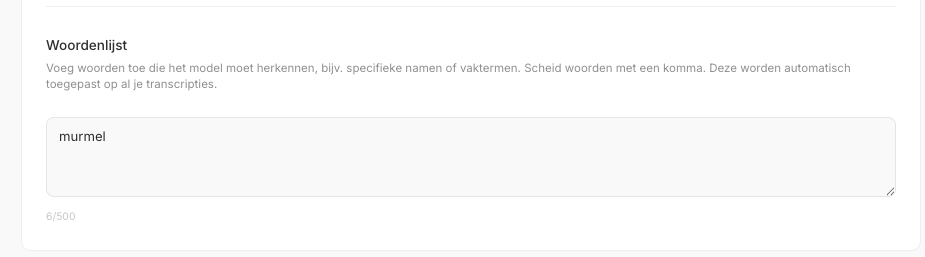
We kept it as simple as possible. You set your vocabulary once at the account level, and we automatically apply it to all your future transcriptions.
- Go to your Profile: In the dashboard, click on your name and navigate to Settings.
- Fill in your Vocabulary: Type in the words you use often, separated by a comma. For example: Murmel, Rijkswaterstaat, City of Utrecht.
- Automatically Saved: Your changes are saved immediately. As soon as you upload a new audio file via the Studio (or via the API), the model reads your personal vocabulary and includes it in the process.
In the Studio, you will now also see a handy shortcut ("Woordenlijst →") in the options panel, so you can quickly add to your list right before an upload.
Available via the API
For our integration partners and developers, we have made this feature directly available in API v1.
By default, the API automatically uses the vocabulary set in your profile. Do you want to pass a different list per call (for example because you process audio from different customers)? Then you can use the new ?hotwords= parameter to override the profile setting per audio file.
Available immediately
Custom Vocabulary is available today for all our users. Log in, navigate to your profile, and train Murmel to speak your language!
Do you have feedback or suggestions for new features? Let us know through the usual channels.