Why a vocabulary helps
A speech model picks the most likely spelling for every word. With ordinary words that works well. But a surname like "Kruithof" could just as well be "kruit hof", and an abbreviation like "Wmo" sounds to the model like three separate letters. The vocabulary gives the model a preference for your words in advance, so it picks the right one when in doubt.
The model behind Murmel is already trained on Dutch speech (see the Murmel v5 benchmark), but no model knows the names in your team or the abbreviations in your files. That is what the vocabulary is for.
How to add words
- Open your settingsIn the app, go to your profile. That is where the Vocabulary field is.
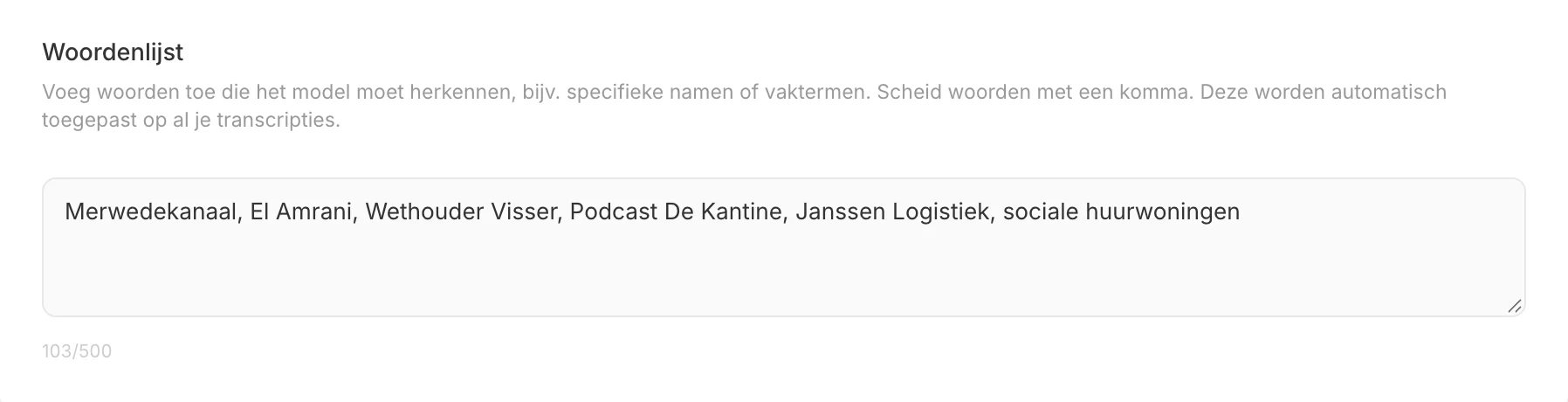
- Type your words, separated by commasFor example: Kruithof, Wmo, Rijkswaterstaat, Gemeente Utrecht. You have 500 characters, enough for roughly 40 to 60 terms.
- Click outside the fieldThe list is saved immediately and applies to all your new transcriptions: uploads, recordings and meetings.
The list works going forward: transcripts that are already finished do not change. If a name is wrong in an old transcript, you correct it in the editor.
Examples per sector
| Sector | What you add | Example |
|---|---|---|
| Municipality | Names of council members and aldermen, parties, districts, schemes | Wmo, Jeugdwet, Omgevingswet, Kanaleneiland |
| Legal | Party names, Latin terms, statutory articles | jurisprudentie, cassatie, ex nunc, Awb |
| Healthcare (as an example of terms) | Medical terms you use often | tachycardie, hemodynamisch, anamnese |
| Research | Concepts from your field, names of institutions | thematische analyse, NWO, ZonMw |
| Business | Product names, client names, internal abbreviations | Murmel, OKR, scrum master |
Example: a committee meeting
A council clerk has the meeting of the Social Affairs committee transcribed. Without a vocabulary the transcript may say "the wet mo" instead of "the Wmo", council member Kruithof may become "kruit hof" and the district Kanaleneiland "kanalen eiland". Each mistake is small, but in a two-hour report you have to hunt them all down by hand.
With the vocabulary "Wmo, Kruithof, Kanaleneiland, Sociaal Domein" these words come out right at the next meeting. The clerk adds the names of all committee members once and only updates the list when someone new joins. More on transcription for municipalities on transcription for government.
Tips for a good vocabulary
- Write words the way you want them in the transcript, with capitals and spaces: "Gemeente Utrecht", not "gemeenteutrecht".
- Pick words that go wrong, not words you find important. The model already knows ordinary words like "budget". Every slot you spend on a familiar word cannot go to a difficult name.
- Start small. Transcribe a first recording, see which names go wrong and add exactly those to the list.
- Update the list per project. When you start a new study or case, replace the names from the previous one.
Also through the API
Through the API Murmel uses the vocabulary from your profile by default. If you process audio for different clients, you pass a separate list per request with the hotwords parameter. The background of this feature is in the blog post on custom vocabulary.
Frequently asked questions
Does the vocabulary cost extra?
No, it is included in every plan and also works with prepaid credits. See pricing.
Does the vocabulary work for English terms too?
Yes. Murmel recognises Dutch and English, also mixed in one recording. You can add English terms like "stakeholder" or product names as they are.
How many words can I add?
The field holds 500 characters. So choose the words that actually go wrong in your recordings.